Jobs in one place
Each job has its own number, customer, address and appointment. Move it from Scheduled to In progress to Closed, and see your jobs on a calendar.
For electricians
Job management software for electricians: log the work on every job, and let the system do the sums.
Bludge is a hosted system for running a business, set up for you by a person. For electrical work, we have built a setup for jobs, labour and materials. An electrician can log the work in the app, or type or say what they did to a connected AI agent. Each entry follows the job form’s rules, and the electrician confirms it before it is saved.
The work it handles
Each job has its own number, customer, address and appointment. Move it from Scheduled to In progress to Closed, and see your jobs on a calendar.
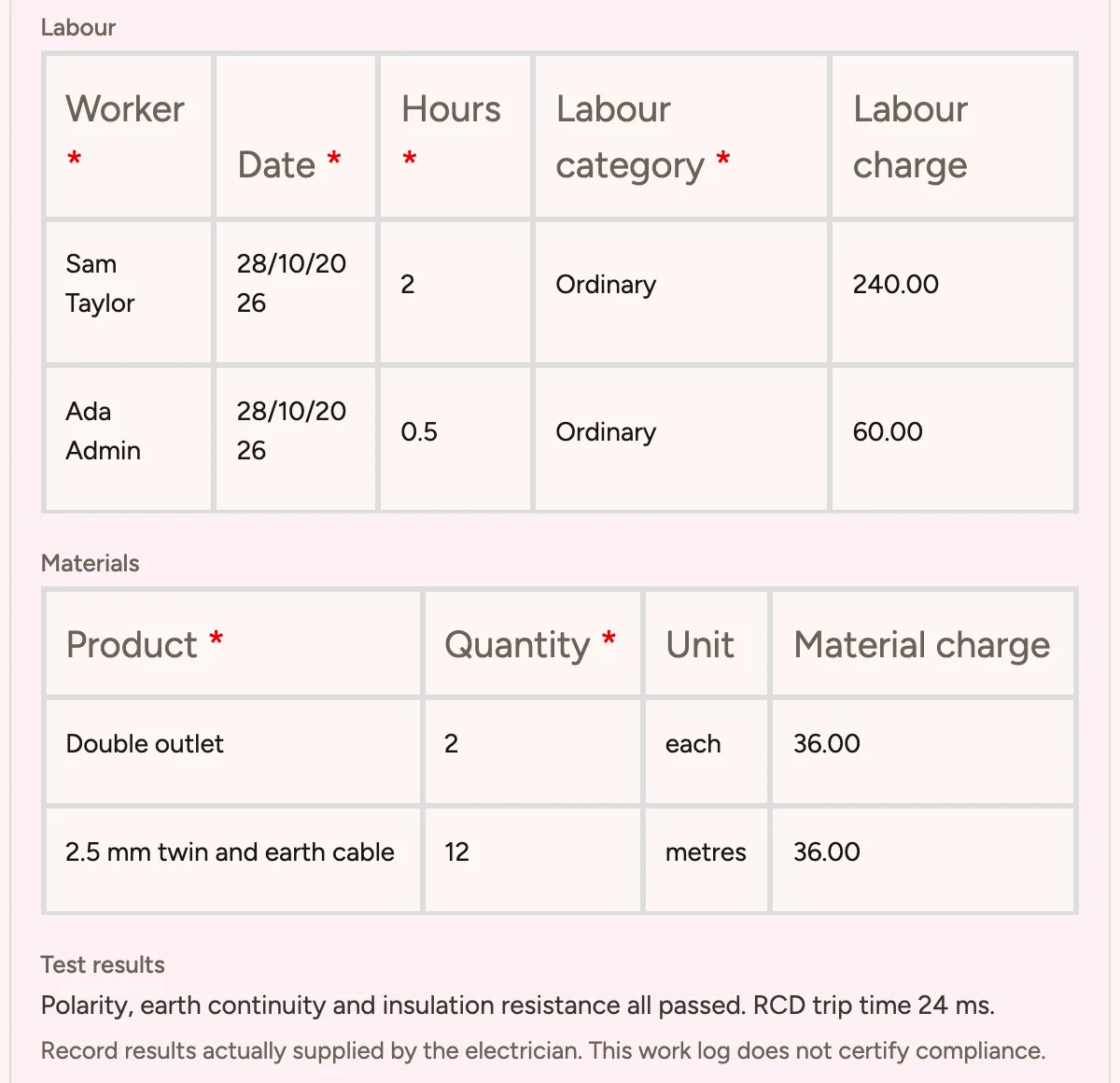
Add a row for each worker with the date, hours and type of work. Every job log needs at least one labour row, and hours must be more than zero.
Pick each material from your own products and enter how much you used. Bludge works out each line and the job’s charge for you.
When you agreed a fixed price for a job, the log keeps that price, whatever the rows add up to.
The setup asks for test results before work is marked complete, and a note of what is left when it is not. Photos and certificate references are optional.
Internal costs and margins are only for supervisors and administrators. Electricians see the work, not the margin.
An electrician can type or say what they did to a connected AI agent. The agent finds the job, asks about anything missing and reads the entry back for them to confirm.
A day with the setup
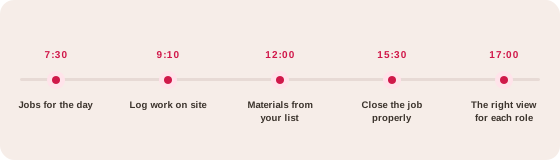
Each electrician opens the calendar and sees their jobs, with the customer, address and appointment.
Hours and type of work go in as labour rows, from the app or by telling a connected agent.
Materials are picked from your own products. Bludge works out each line and the job’s charge.
Test results go in before the job is marked complete. Photos and certificate references are optional.
Supervisors see costs and margin. Electricians see the work.
How it comes together
A kit is configured forms, records, rules and roles. A person sets it up with you and keeps adjusting it.
The job form, its rules and its sums are already built and tested. It is made of forms, records, rules and roles, so it can change as you do.
We add your products, rates, crews and customers, and change the questions to match how you work. When your process changes, we adjust it.
Logging work does not send an invoice or a customer message. Quotes, invoices, payments and phone answering are separate parts of Bludge. We write your call script with you at setup.
With Strategy & growth, we work through Discover, Design and Deploy with you. Agree the work you want more of, then build the website and material to win it.
Connect a compatible AI agent through Bludge’s MCP connector. The agent works within the staff member’s own Bludge permissions and never acts on its own. When it logs a job, it reads the entry back before it is saved, and the job form’s review rules still apply.
No. The setup can store test results and certificate references. It does not create electrical certification. Your own obligations still apply.
No. Logging work does not issue an invoice, use up stock or message the customer. Quotes, invoices and payments are separate Bludge features we can set up with you.
Agents that support MCP connectors use the same Bludge tools. An agent can only see and change what its staff member is allowed to.
You get a quote for your business. It covers setup, ongoing service and any usage charges, such as phone calls. There is no fee per user.
More answers on the FAQs page.
See how Bludge compares with the software most electricians look at first.
Bring an example of the work you want to improve. We’ll show you how the electricians setup would handle it and agree a clear scope.