Customer records
Keep each customer’s preferences, delivery details and how they like to be reminded. Only staff can see them.
For prepared-meal businesses
Meal delivery software: weekly menus and orders, from the kitchen to the door.
Bludge is a hosted system for running a business, set up for you by a person. For meal delivery, we have built a setup for businesses that sell prepared meals each week. Staff keep customers, meals, weekly menus and orders in one place. Bludge works out each order’s totals, and the kitchen follows each order to delivery.
The work it handles
Keep each customer’s preferences, delivery details and how they like to be reminded. Only staff can see them.
Give each meal or add-on a product code, a price and the dates it is available. Mark it Available, Paused or Retired.
Switch each meal on or off for an ordering week, with that week’s price. Earlier weeks keep their own menus.
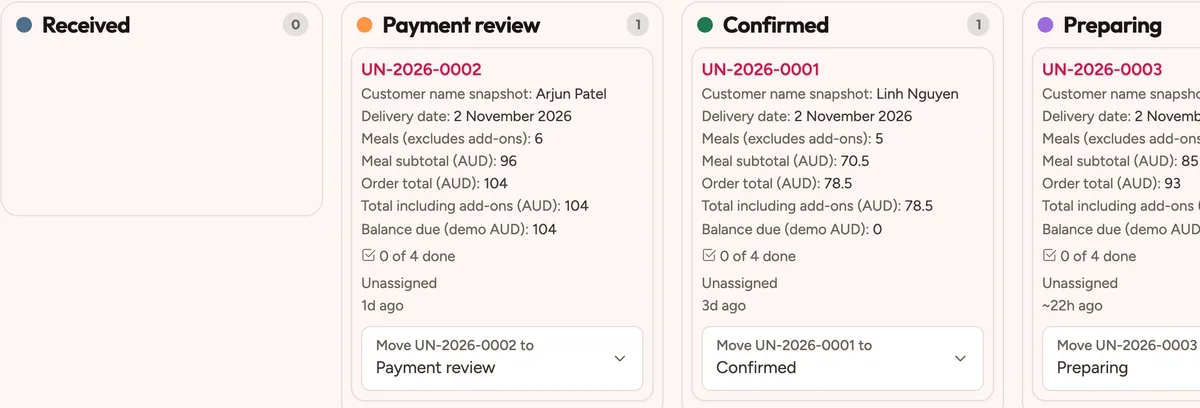
Link each order to its customer and week, with a delivery date. Meals and add-ons go in separate rows, and the order keeps each meal’s details and price as they were.
Bludge works out each line, the meal count, delivery, add-ons, the total and the balance for you. Staff record what has been paid.
Move each order through Received, Confirmed, Preparing, Packed and Delivered. Checklists and a dashboard of the next seven days show what is next.
Saved filters find unpaid orders and customers marked as not yet replied. Reminder messages begin as drafts for staff to review before they go out.
A day with the setup
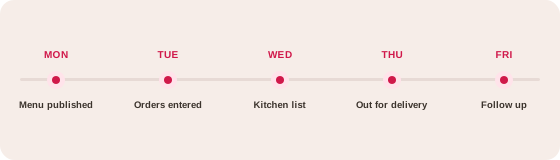
This week’s menu is set from the meal catalogue.
Staff enter each customer’s order. Bludge works out the totals.
The kitchen sees what to prepare, by meal.
Each order is followed from the kitchen to delivered.
Saved filters find unpaid orders, and reminder drafts wait for staff to review.
How it comes together
A kit is configured forms, records, rules and roles. A person sets it up with you and keeps adjusting it.
Four linked forms with repeating rows, calculations, statuses, checklists, filters and a dashboard are already set up.
We agree your menu, prices, options, cut-off times and time zone, then set up your customers and who can see what. We keep adjusting it as your menu changes.
Bludge has online forms, payments, text and email reminders, and phone answering. This setup keeps ordering with your staff. We add each customer-facing part with you when you want it.
With Strategy & growth, we work through Discover, Design and Deploy with you. Agree who your meals are for and what to tell them, then build the website and social posts to reach them.
A compatible AI assistant can connect to Bludge and work inside it, with the same access as the person using it. Ask it which orders are unpaid or what the kitchen has this week. It makes the changes that person asks for and never acts on its own. Ask for a draft when you want to review first.
Staff enter the orders in this setup. When you want customers to order from your website, we add and test an ordering form with you.
Staff record the amount received in this setup. When you want to take card payments, we switch on secure payment links with you.
No. Meal details and customer targets are planning information. The setup does not check nutrition, allergens, food safety or stock, and it does not issue tax invoices.
No. Each ordering week has its own menu, and each order keeps the meal details and price it was made with.
You get a quote for your business. It covers setup, ongoing service and any usage charges, such as phone calls. There is no fee per user.
More answers on the FAQs page.
See how Bludge compares with the software most meal delivery look at first.
Bring an example of the work you want to improve. We’ll show you how the meal delivery setup would handle it and agree a clear scope.