Referrals online or by email
GPs, nurses, allied health and community workers refer people on a public form or by email. Each referral records the person’s consent to be referred and contacted.
For social prescribing services
Social prescribing case management: every referral is one person’s journey, followed from start to finish.
Bludge is a hosted system for running a business, set up for you by a person. For social prescribing, we have built a setup for an Australian service, such as one funded through a Primary Health Network. Referrers send people to you online or by email. Link workers follow each person through conversations, wellbeing measures and community connections, and the funder report keeps itself up to date.
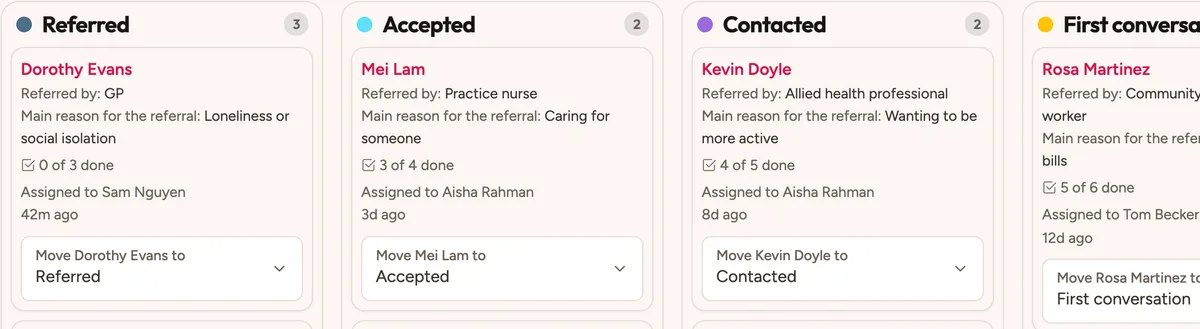
The work it handles
GPs, nurses, allied health and community workers refer people on a public form or by email. Each referral records the person’s consent to be referred and contacted.
A team leader triages each referral and gives it to a link worker. Every stage has its own due date, so “overdue” means that stage is late.
Record what matters, goals, strengths and what gets in the way. Each review keeps a new version, and the participant can see it in the portal.
Log each conversation, call or visit on a calendar. A check-in is added each fortnight, and a referral with nothing for three weeks gets a task.
Ask the ONS4 wellbeing questions and a short loneliness scale at the start, midway and end. Bludge works out the change, and very low scores alert the team leader.
Keep a directory of local services. Record each referral to a service, with a follow-up after two weeks to see if the person connected.
Letters to referrers are made when the person agrees. The funder report shows referrals, time to first contact, engagement, connections and change in wellbeing.
A day with the setup
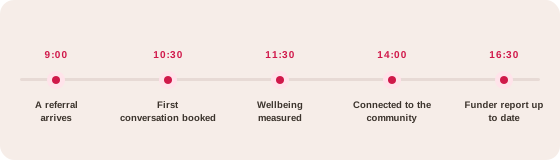
A GP sends it through the online form. It lands with the link worker team.
The link worker books the conversation and records consent.
The first measure is recorded, ready to compare later.
A walking group is added as a community connection.
The report counts referrals, conversations and outcomes without a spreadsheet.
How it comes together
A kit is configured forms, records, rules and roles. A person sets it up with you and keeps adjusting it.
Forms, rules, dashboards, letters and guides are already set up as case management. A referral is one person’s episode of support.
We set up your areas, roles, referrers and services, and change the forms to match your program and funder. We keep adjusting it as your program changes.
Link workers see their own area’s participants. Staff-only notes never reach referrers or the portal. Staff emails do not name participants.
Referrers use a public form or email. Participants see their own plan and measures in the portal, and can fill in measures from a personal link.
With Strategy & growth, we work through Discover, Design and Deploy with you. Agree how you explain your service to referrers and funders, then build the material to match.
AI features stay off until your service turns them on, and that should wait until after a privacy review. When they are on, a connected assistant has the same access as the person using it, makes only the changes that person asks for, and never acts on its own.
The ONS4 personal wellbeing questions, a three-item loneliness scale and the ONS direct loneliness question. Licensed measures such as WHO-5 and WEMWBS are not included.
The funder report covers what PHNs often ask for, over the last 90 days. You can change each figure’s period. Exports in a set PHN format are not built yet.
Staff only. Link workers see their own area. Intake officers see referrals and connections, not sessions, plans or measures. Referrers never see staff-only notes.
Bludge makes the letters. The closing letter is for staff to send through your practice’s secure messaging, which is not connected to Bludge.
We plan a privacy review with you before you go live. It covers access, hosting, sign-in, email, record keeping and any AI use, and we set each one up with you.
You get a quote for your business. It covers setup, ongoing service and any usage charges, such as phone calls. There is no fee per user.
More answers on the FAQs page.
See how Bludge compares with the software most social prescribing look at first.
Bring an example of the work you want to improve. We’ll show you how the social prescribing setup would handle it and agree a clear scope.